Get paid faster with a billing assistant.
Say what you did, who it was for and what to charge. Billery turns it into a branded invoice or quote you can send and get paid in seconds.
3 invoices + 3 quotes free Every feature included

Made for anyone who sends an invoice
- Designers
- Consultants
- Photographers
- Tutors
- Therapists
- Hairdressers
- Caterers
- Makers
- Developers
- Cleaners
- Gardeners
- Plumbers
- Electricians
- Coaches

Built for freelancers and contractors
Finish the job. Say a sentence. Get back to work.
No spreadsheets, no templates, no evenings lost to paperwork. Billery writes it up so you can get on with the next client.
Describe it
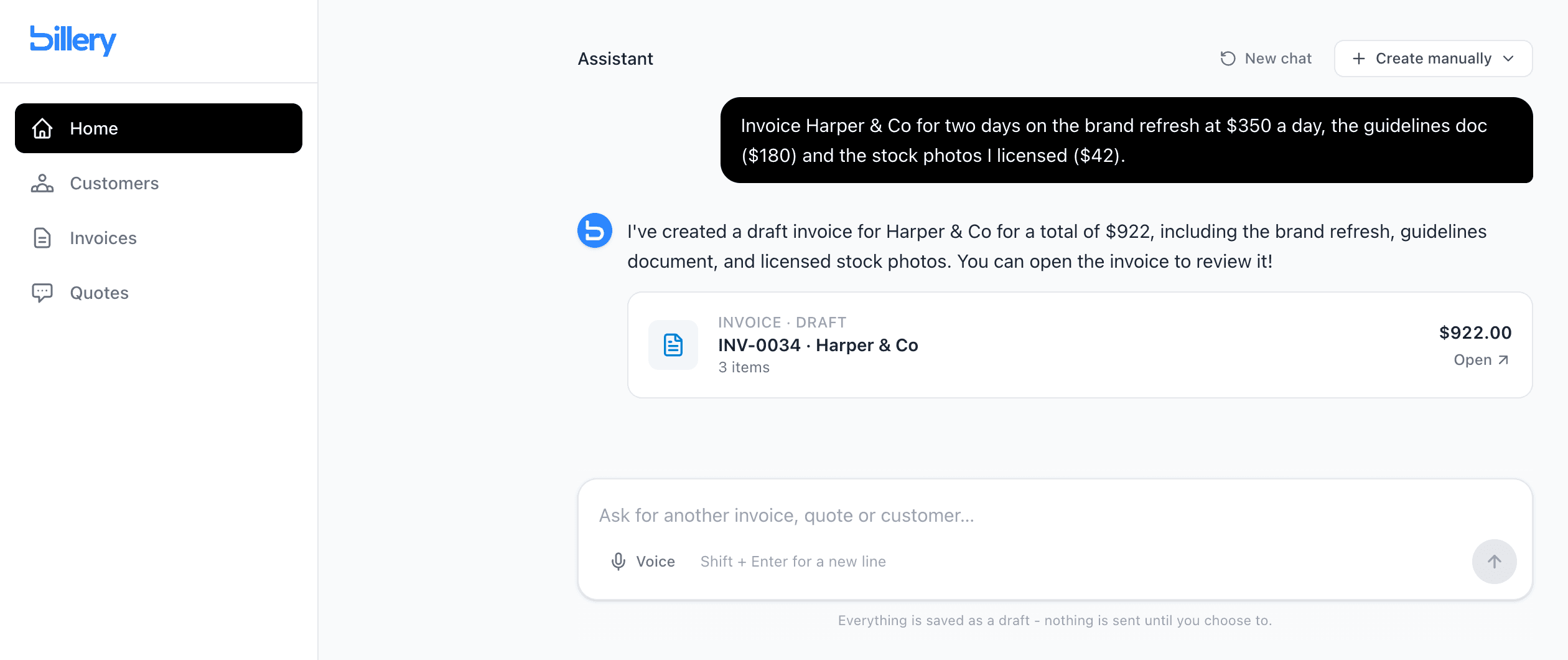
Tell it about the job. It writes the invoice.
Type or dictate the work in your own words. Billery works out the customer, line items, quantities and prices, then hands you a finished draft.
- Voice input for when your hands are full
- Finds existing customers, or adds new ones
- Everything starts as a draft you can edit
Track it
Know who's paid without opening a spreadsheet.
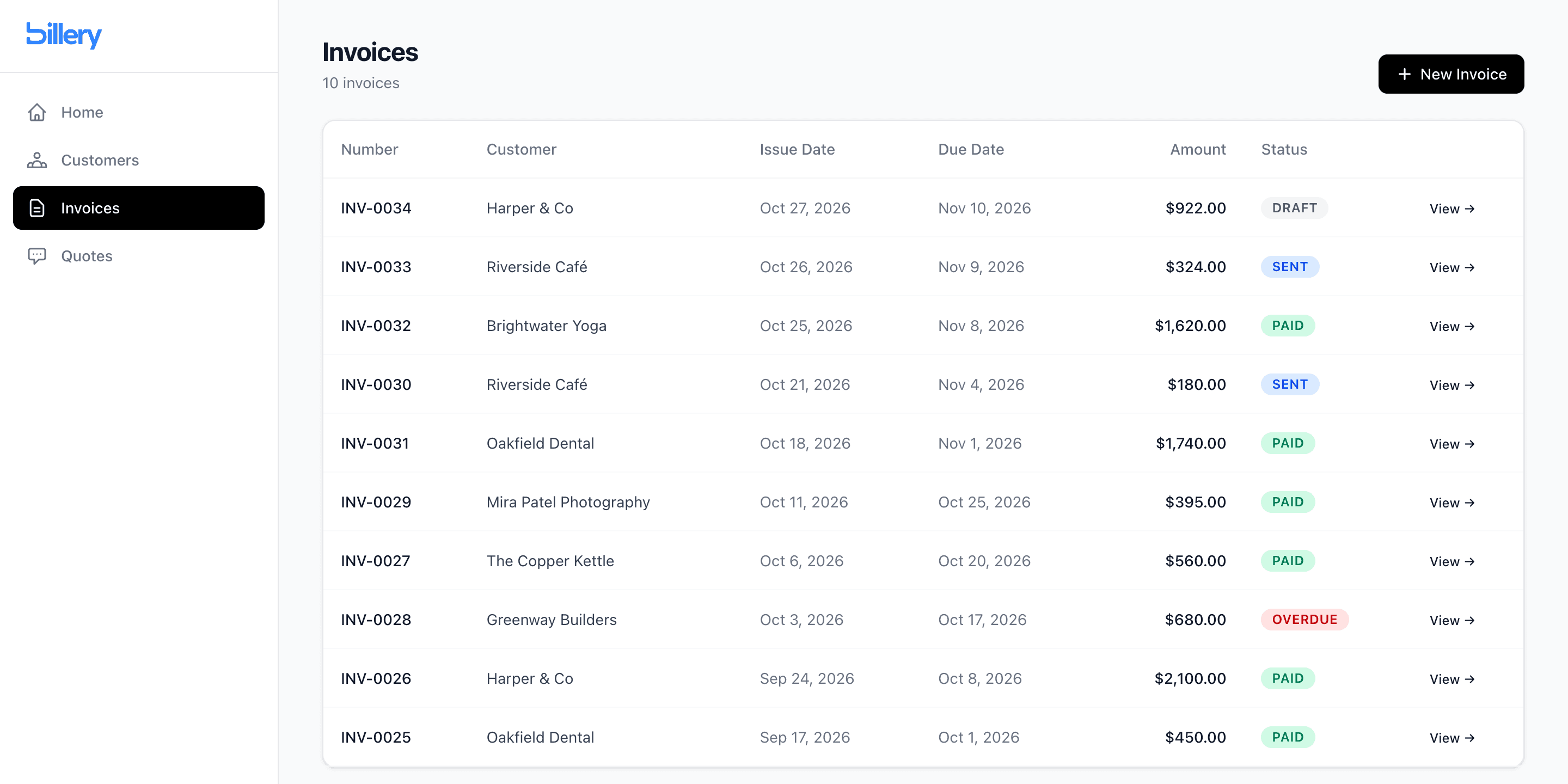
Every invoice moves from draft to sent to paid. Overdue ones stand out, so you know exactly who to chase.
- Draft, sent, paid and overdue at a glance
- Mark paid the moment the money lands
- Every customer's history in one place
Send it
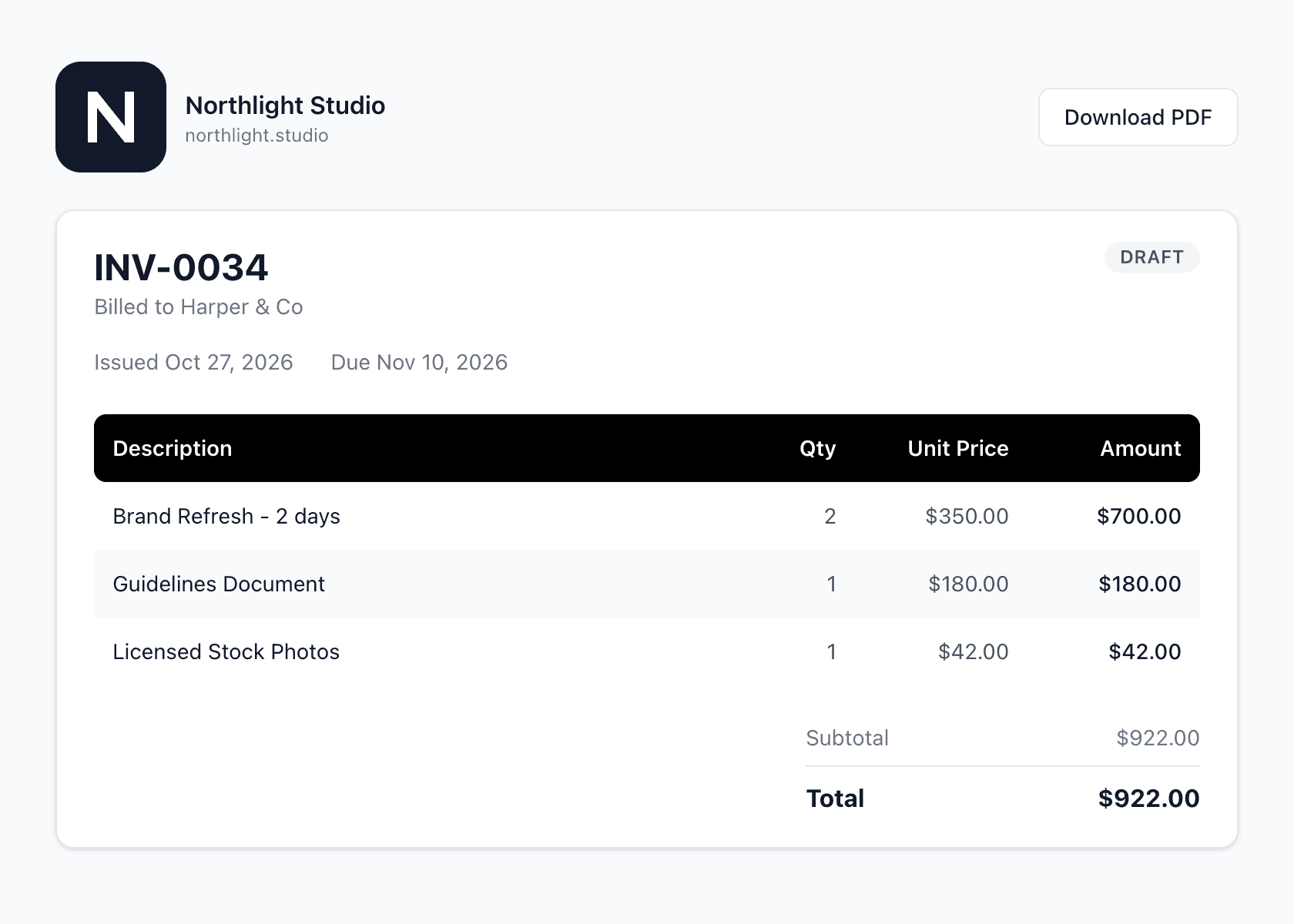
Your customer gets something that looks the part.
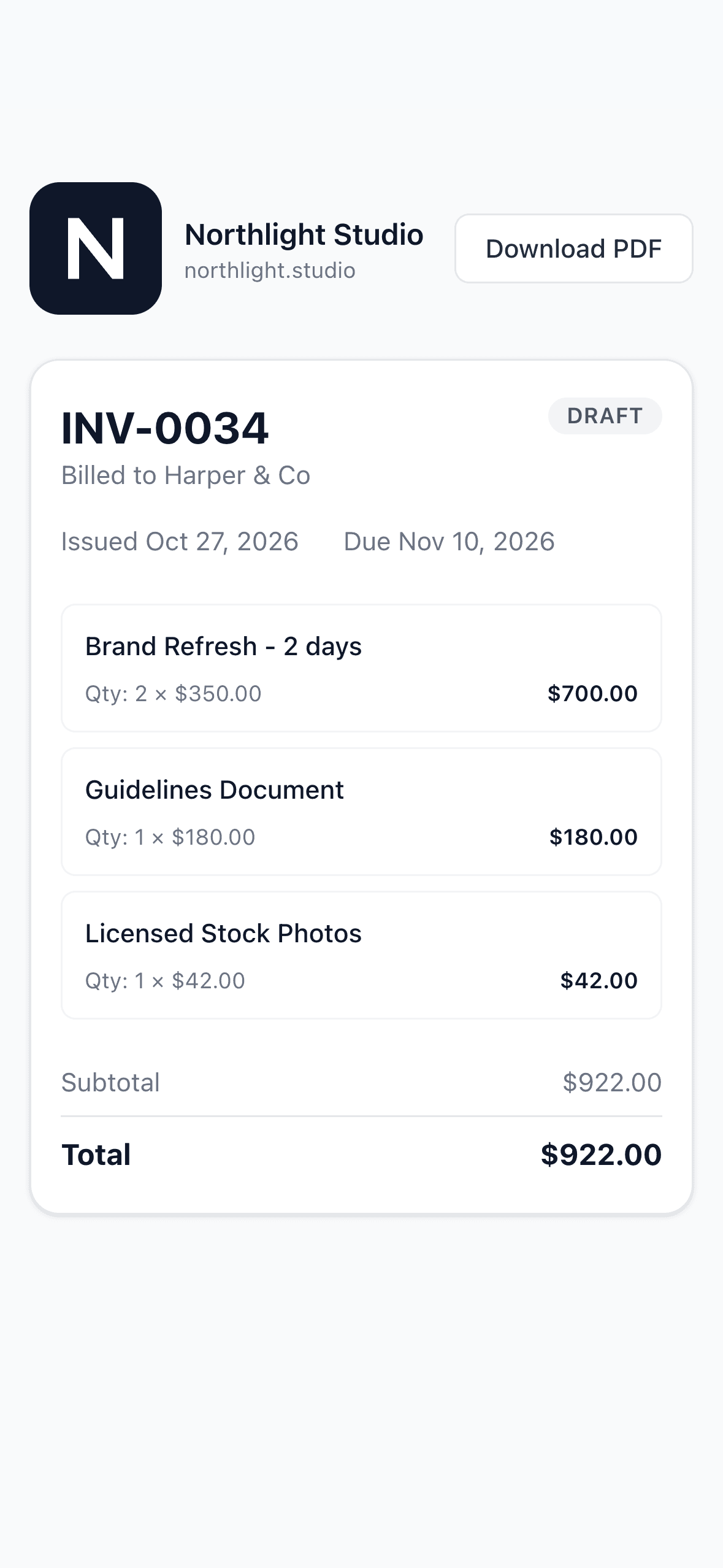
Email a branded PDF in one tap, or share a link that opens on any device. Your logo and details on every page, no account needed on their end.
- Email it, share a link or download the PDF
- Your logo, address and payment details
- Opens beautifully on any phone or laptop
Get paid
Let them pay the moment they open it.
Connect your own Stripe account and customers can pay by card straight from the invoice. Prefer bank transfer? Your details and the reference are printed on it. You choose what each invoice accepts.
- Card payments go straight into your Stripe account
- Paid by card? The invoice marks itself paid
- See how every invoice was paid
Works where you work
Bill from ChatGPT or Claude, your browser, your own code, or an AI agent.
Same account, same branding, same drafts. Start an invoice wherever you happen to be, or let your software do it for you.


Billery in ChatGPT and Claude
Add Billery to ChatGPT or Claude and invoice mid-conversation. Create invoices, quotes and receipts, look up customers, and get a link or PDF to send. Everything starts as a draft, and nothing reaches your customer until you choose to send it.

Let an AI agent bill for you
Give your AI assistant or automation its own key and rules. It can create invoices and send them up to a limit you set. Anything bigger waits for your approval, and every action is logged.
How agents workREST API & webhooks
Raise and send documents from your booking form, shop or job software. Signed webhooks tell you when they're paid.
Explore the APIChrome extension
Draft an invoice from any tab without switching apps. Billery, one click from your toolbar.
On your device
- iPhone & iPad
- Open in Safari → Tap Share → Add to Home Screen
- Android
- Open in Chrome → Tap the ⋮ menu → Install app
- Desktop
- Open in Chrome or Edge → Click the install icon
And of course, in any browser at app.billery.io
Who it's for
Whatever the work looks like, the invoice takes a sentence.
Studios, clinics, classrooms, kitchens, market stalls and vans. If you send invoices or quotes, this was built with you in mind.
For developers
Bill straight from your own app, or your AI agent.
If the work already starts somewhere else - a booking form, an online shop, your own tools or an AI agent - one API call raises the document and emails your customer a branded PDF.
- Invoices, quotes, receipts and usage billing
- Agent keys with limits and approvals, over the API or MCP
- Signed webhooks, test keys and safe retries
curl https://app.billery.io/api/v1/invoices \ -H "Authorization: Bearer blry_live_..." \ -H "Content-Type: application/json" \ -d '{ "customer": { "name": "Harper & Co", "email": "hi@harper.co" }, "items": [ { "description": "Brand refresh", "quantity": 2, "unit_price": 350 } ], "due_in_days": 14, "send": true }' # → 201 Created · INV-0042 · PDF emailedPricing
Start free. Upgrade when it's paying for itself.
One plan, one price. No per-seat maths, no add-ons.
Free
Try everything, on the house.
$0 to start
- 3 invoices and 3 quotes included
- Unlimited customers
- AI drafting, voice input, PDF and email sending
- Share links and your own branding
- Card and bank transfer payments
Pro
For when the invoices keep coming.
$20 / month
- Unlimited invoices and quotes
- Everything in Free
- API access, AI agents and webhooks
FAQ
Questions people usually ask.
Is Billery free?
Yes to start. Your first 3 invoices and 3 quotes are free, with every feature included. After that, Pro is $20/month for unlimited invoices and quotes. Customers are unlimited on both plans.
How do my customers pay me?
However you choose, per invoice. Connect your own Stripe account and customers can pay by card straight from the invoice, or add your bank details for a bank transfer. Card payments go directly into your Stripe account and mark the invoice paid automatically. Billery never holds your money.
Can I use Billery from ChatGPT or Claude?
Yes. Add Billery to ChatGPT or Claude and connect your account once by signing in. Then tell it what to bill. Everything is created as a draft with your branding, and nothing reaches your customer until you choose to send it.
What does it mean to let an AI agent bill for me?
If you use an AI assistant or automation for your work, give it its own Billery key with rules you set: whether it can create invoices, whether it can send them, and up to what amount. Anything above your limits waits for you to approve it, and every action shows up in its activity log.
Do my customers need an account?
No. They receive a PDF by email or open a share link in their browser. Nothing to sign up for on their end.
Can I use my own logo and business details?
Yes. Upload your logo and fill in your company name, address and website in Settings. They're added to every invoice and quote PDF automatically.
Is there a mobile app?
Native iOS and Android apps are on the way. Today, Billery runs in any modern browser and you can install it to your home screen so it opens like an app: in Safari tap Share → Add to Home Screen, or in Chrome use the ⋮ menu → Install app.
Can I send invoices from my own app or website?
Yes. Pro includes API access, so your booking form, shop, internal tools or AI agents can create and send invoices, quotes and receipts, and bill for usage. Payments still go straight to you.
How do I cancel Pro?
From Settings → Billing → Manage billing. Cancelling takes effect at the end of your current billing period and you keep access until then.
Your next invoice is one sentence away.
Your first 3 invoices and 3 quotes are on us.